
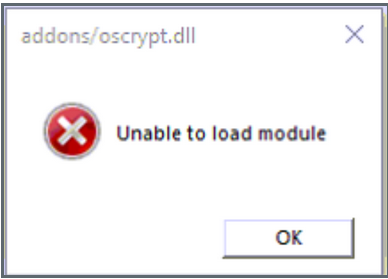
Program produces error: ’Unable to load moduleaddons/oscrypt.dll
Resolution I
-
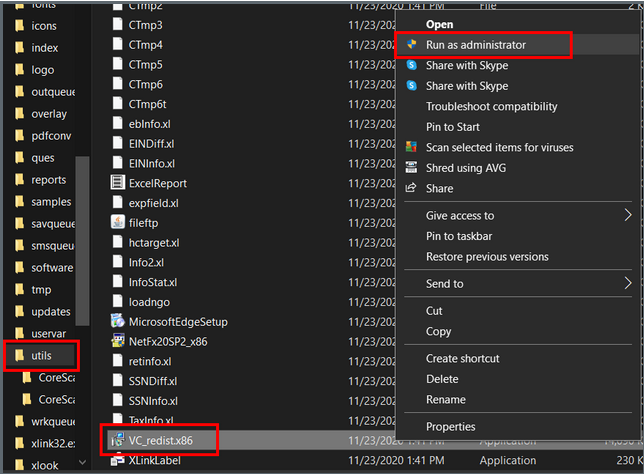
On the PC with the error, navigate to the install folder.
-
Open the utils folder
-
Right click on application VC_redist.x86
-
Run application as administrator
- Reboot PC if the installer tells you to.
Resolution II
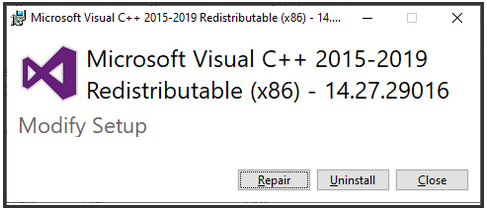
- If prompted to Repair or Uninstall; try Repair first.
- Attempt to open program after repair.
- If Repair doesn't correct error, Run the file VC_redist.x86 to Uninstall
- After uninstall completed; Re-Run the VC_redist.x86 application file to Install.
- Reboot PC if the installer tells you to.
Resolution III
- On the PC with the error, navigate to the install folder.
- Open utils folder
- Run the file VC_redist.x86 to uninstall the Microsoft Visual C++ Redistributable x86
- Download vcredist_x86 application. (Link for DL)
- Run downloaded vcredist_x86 application to install.
-
Re-run the VC_redistx86 in the utils folder AFTER running the vcredist_x86 application.